Getting started
Create a project with one command, connect GitHub so agents can touch code, and put your secrets where the engine and the sandboxes can read them.
From zero to a running project in one command.
loopy init creates a complete, working project: a registry.yml,
one runnable starter workflow, and the two env files that hold
secrets. The starter triggers on the built-in Github.PullRequestOpened event,
so there's no sensor to write. It compiles green out of the box, so you start from
something that runs rather than a blank directory. The command is interactive: it asks how
you plan to host the engine and which repos the agent works on, offers to fill
in the credentials it finds on your machine, and then tells you what is still missing
before a first run.
1. Name it and pick the repos
Pass a name or let it prompt. The name doubles as the new directory, so it has to be a
single path segment. Then it asks which repo or repos the agent should work on. Name one
or more and the starter workflow works on code: when a pull request opens, an agent
reviews the diff in a checkout and posts its findings as review comments. Proceeding
without a repo is strongly discouraged (the prompt warns and asks you to confirm): Loopy is
built around agents that work on repos, so a repo-less project ships the same review
workflow disabled (as code-review.md.disabled, a name discovery skips) plus
the registry.yml and env files, so it still compiles green while you wire up
GitHub access, then enable the workflow by renaming it.
$ loopy init my-project
  Which repo(s) should the agent work on? (owner/repo, comma-separated)
  acme-labs/api

  📦  Created Loopy project 'my-project'
  ────────────────────────────────────────
      my-project/registry.yml
      my-project/workflows/review/code-review.md
      my-project/secrets/base.env
      my-project/loopy.env
      my-project/README.md
      my-project/.gitignore
2. The wizard fills in what it can
The new project ships placeholders on purpose, and the wizard offers to replace them with
real values it finds in your environment. If ANTHROPIC_API_KEY is present in
your environment, it offers to write it into secrets/base.env. If
DAYTONA_API_KEY is present, it offers to write it (and
DAYTONA_API_URL if set) into loopy.env. Up front it asks how you
plan to host the engine, because that decides where the public webhook base URL comes from.
If you bring your own (a deployed host or a dev tunnel), it asks for it and stores it in
loopy.env as LOOPY_PUBLIC_URL; if you pick the bootstrap path
(loopy provisions a starter stack on AWS for you), it skips
that question, because loopy deploy bootstrap mints the URL and writes it back for
you. Either way, each webhook sensor receives deliveries at that base plus its path, for
example <base>/hooks/github, and loopy run prints the full
delivery URLs at startup. When you named a repo, it
offers to set up git auth by running the
GitHub App manifest flow right then. Registering
the GitHub webhooks is a separate, deliberate step: once a public URL is set, run
loopy webhooks github. Every prompt has a sensible
default, and declining just leaves the step for later.
3. Check what is left, then run
The last step is to make sure the project is actually set up to run. init
finishes by running the same checks as loopy doctor and printing anything
left to fix: a placeholder API key still in place, a repo with no git auth, an App that
was created but not installed on the repos in registry.yml. Fix those, then
start the engine with loopy run. There is no separate compile step:
loopy run compiles the project first, then starts it.
cd my-project
loopy doctor             # re-check the remaining gaps any time
loopy run                # compiles, then starts the engine
What gets written
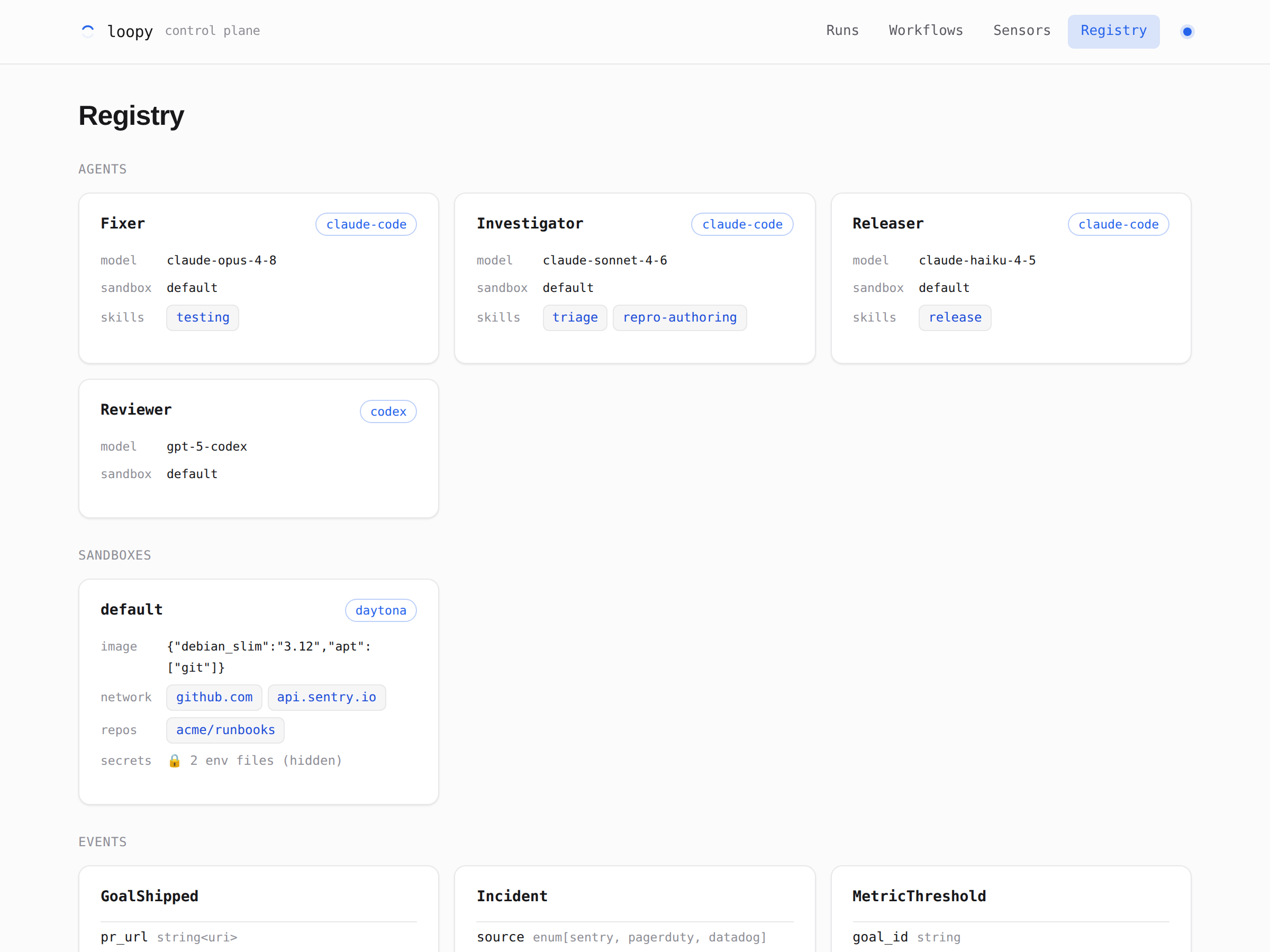
The pieces the project shares: a BaseSandbox sandbox on provider: daytona, and one agent per harness, each naming its model and harness on its own line: Claude (claude-opus-4-8, claude-code), Codex (gpt-5.5, codex), and OpenCode (claude-sonnet-4-6, opencode). The defaults.agent block sets only the shared sandbox. The starter workflow triggers on a built-in Github.* event, so there are no events to declare here. Edit it to change the model, the sandbox, or the egress allowlist.
The starter workflow, review/code-review.md: it triggers on the built-in Github.PullRequestOpened event, reviews the PR's diff in a checkout, and posts its findings as review comments.
The sandbox's secrets, injected into the agent at runtime: the model key (ANTHROPIC_API_KEY or OPENAI_API_KEY), and a GITHUB_TOKEN only if you are not using a GitHub App. Gitignored.
The control-plane credentials the engine needs to boot: the Daytona key, the public webhook base URL (LOOPY_PUBLIC_URL), the GitHub App id and private key that loopy auth github writes here, and the webhook signing secret that loopy webhooks github writes here. Gitignored.
Create your own GitHub App with the manifest flow.
For agents to touch code, Loopy needs git auth. The recommended way is your own GitHub App,
created in one command with loopy auth github. There is no central Loopy app and
no persistent server: you own the App, it lives under your account or org, and the flow runs
from your machine. GitHub calls this the manifest flow.
1. Run the command
The CLI assembles a GitHub App manifest with minimal permissions and no webhook, then starts
a one-shot listener on 127.0.0.1 and opens your browser. Add --org
to create the App under an org instead of your personal account.
$ loopy auth github --org acme-labs

  🔐  loopy auth github
  → creating GitHub App 'loopy-acme-labs-4f2a' under org 'acme-labs'
  → opening browser to create the app: http://127.0.0.1:8765/
2. Confirm the App on GitHub
A small local page auto-submits the manifest to GitHub, so you fill nothing in. GitHub shows a pre-filled confirmation, and you click once to create the App under your own account or org.
3. Land the credentials and install
GitHub redirects back to the local callback with a temporary code, which the CLI exchanges
for the App's permanent credentials. It writes GITHUB_APP_ID and
GITHUB_APP_PRIVATE_KEY into loopy.env (and adds it to
.gitignore, since it now holds a key). Creating the App does not install it, so
the CLI then opens the install URL for you to pick exactly which repos the App can touch, and
waits for the install to land. It finishes by pointing you at the next step,
loopy webhooks github, which registers the GitHub webhooks on those repos once a
public URL is set; see
Integrations.
  ✓ wrote App id + private key to loopy.env (gitignored)

  Next: install the App on the repos loopy should access:
    https://github.com/apps/loopy-acme-labs-4f2a/installations/new
  → opening the install page in your browser…

  Waiting for the install to land… (Ctrl-C to skip and finish later)
  ✓ installation 4815 (acme-labs): token minted, 2 repo(s) reachable
Secrets live in env files, never in the manifest.
Loopy keeps credentials out of the code and out of compiled output. Secrets are read from dotenv files that you reference by path, not by value. They are resolved at runtime, injected only where they're needed, and never logged or written to the manifest. There are two surfaces you'll touch: the control-plane env file for the engine itself, and a sandbox env file for the agents.
The control-plane env file
loopy.env at the project root holds the infrastructure credentials the
engine itself needs to boot: the message bus and the sandbox provider. The file is
optional and meant for local development, where it saves you from exporting these
variables in your shell before every run. At startup, loopy run reads it and
copies each value into the process environment only if that variable is not already set,
so the real environment always wins. In production, skip the file and set the same
variables through your platform's environment or secret store.
# Infra creds the engine needs to boot. Used for local development;
# in production, set these in the platform environment instead.
REDIS_URL=redis://localhost:6379        # only with --bus redis
DAYTONA_API_KEY=dt-...                  # the sandbox provider
The sandbox env file(s)
A sandbox declares its secrets with env_file: in registry.yml: a
path, or a list of paths, relative to the project root. The compiler records only the
path; the file is read at runtime, once per step, and the parsed
KEY=VALUE pairs are injected into that sandbox as environment variables. The
agent (and the git it runs) read them from there. The engine's own creds
(loopy.env) never reach the sandbox.
sandboxes:
  BaseSandbox:
    provider: daytona
    image:    { debian_slim: "3.12", apt: [git], workdir: /home/loopy, user: loopy }
    env_file: secrets/base.env    # path only, contents read at runtime
# env_file can also be a list: [base.env, dev.env] (merged in order)# Injected into the sandbox as environment variables at runtime.
ANTHROPIC_API_KEY=sk-ant-... # for the claude-code harness
OPENAI_API_KEY=sk-... # for the codex harness
GITHUB_TOKEN=ghp_... # git auth, unless a GitHub App is configuredWatch what's running from one screen.
loopy admin serves a read-only dashboard over a running deployment, so you can see
how the system behaves without tailing logs. With no LOOPY_PUBLIC_URL set it
reads the run-state DB a loopy run on this machine writes; when one is set it
proxies to your hosted control plane instead, reaching $LOOPY_PUBLIC_URL/admin
over HTTPS with a bearer token. On a host you run (Render, Fly, a VM) that URL is hit
directly, no tunnel; the bootstrap deploy target is the exception, where the
CloudFront URL is reached over an SSM tunnel (see Deployment).
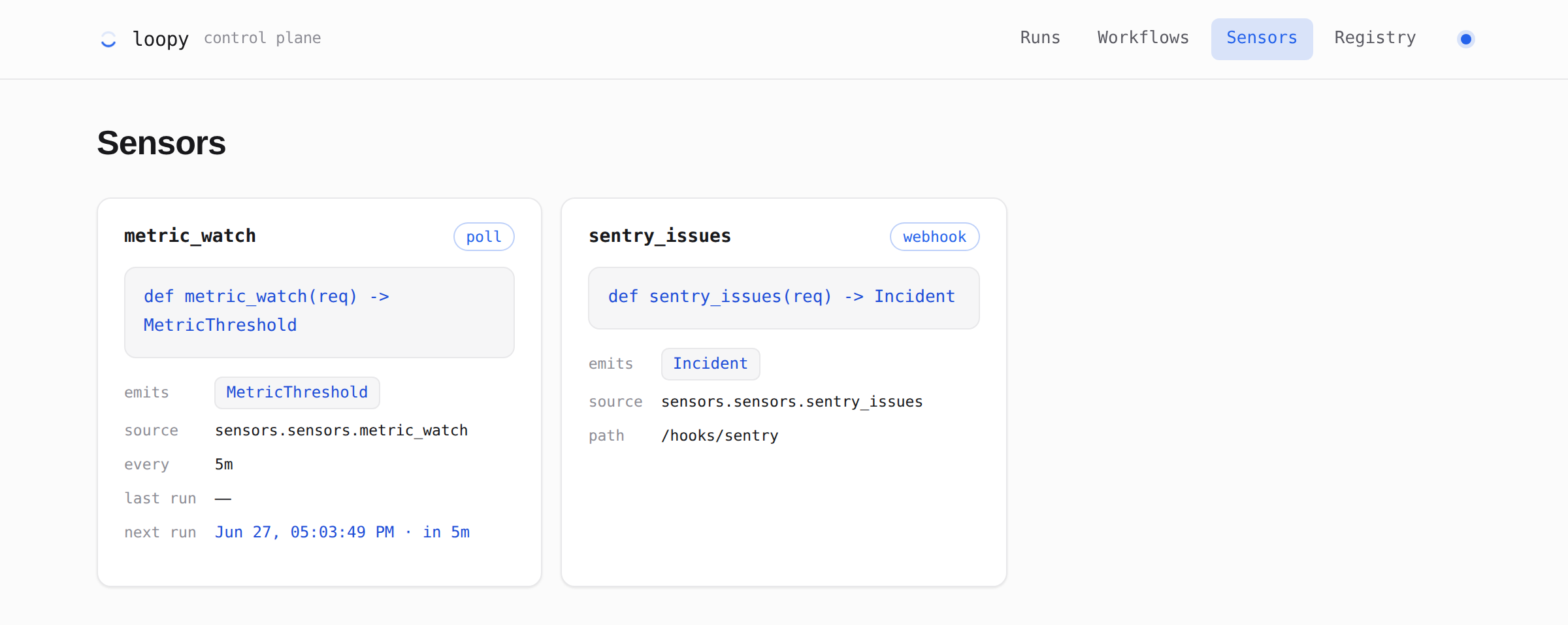
It answers two questions: what is defined
(workflows, sensors, and the registry, read from the compiled manifest.json) and
what happened (run history, read from the run-state DB that loopy run writes).
It only reads. It never writes, and it never serves secret values.
# point it at the run-state DB; a manifest lights up the template/registry views
loopy admin                                  # no public URL set → local, http://127.0.0.1:9000
loopy admin --local --manifest manifest.json --port 9000 --db .loopy/state.db
The run views work with just the DB. The workflow, sensor, and registry views appear when a
manifest.json
is present. To explore the dashboard without a real deployment, loopy demo
serves every view against in-memory sample data.
Runs
The Runs view lists every run newest-first, filterable by state (all, running, completed, failed). Each row shows the run id, its workflow, the event or schedule that triggered it, when it started, and how long it took. The list polls every 3 seconds, so an in-flight run shows up and updates while you watch.
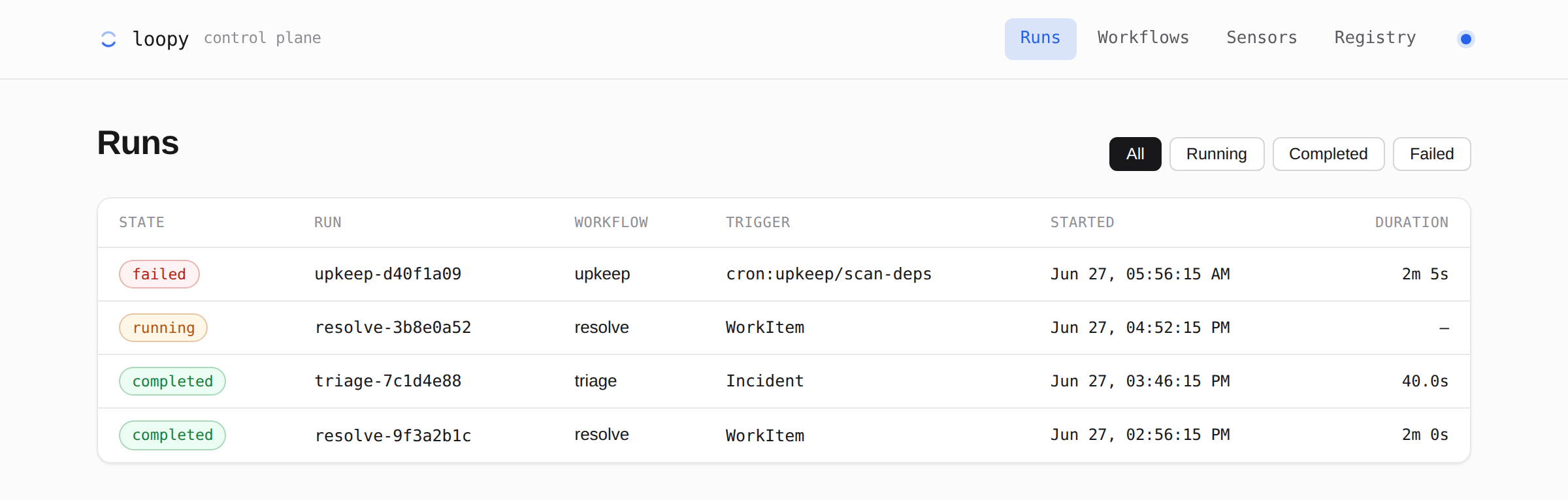
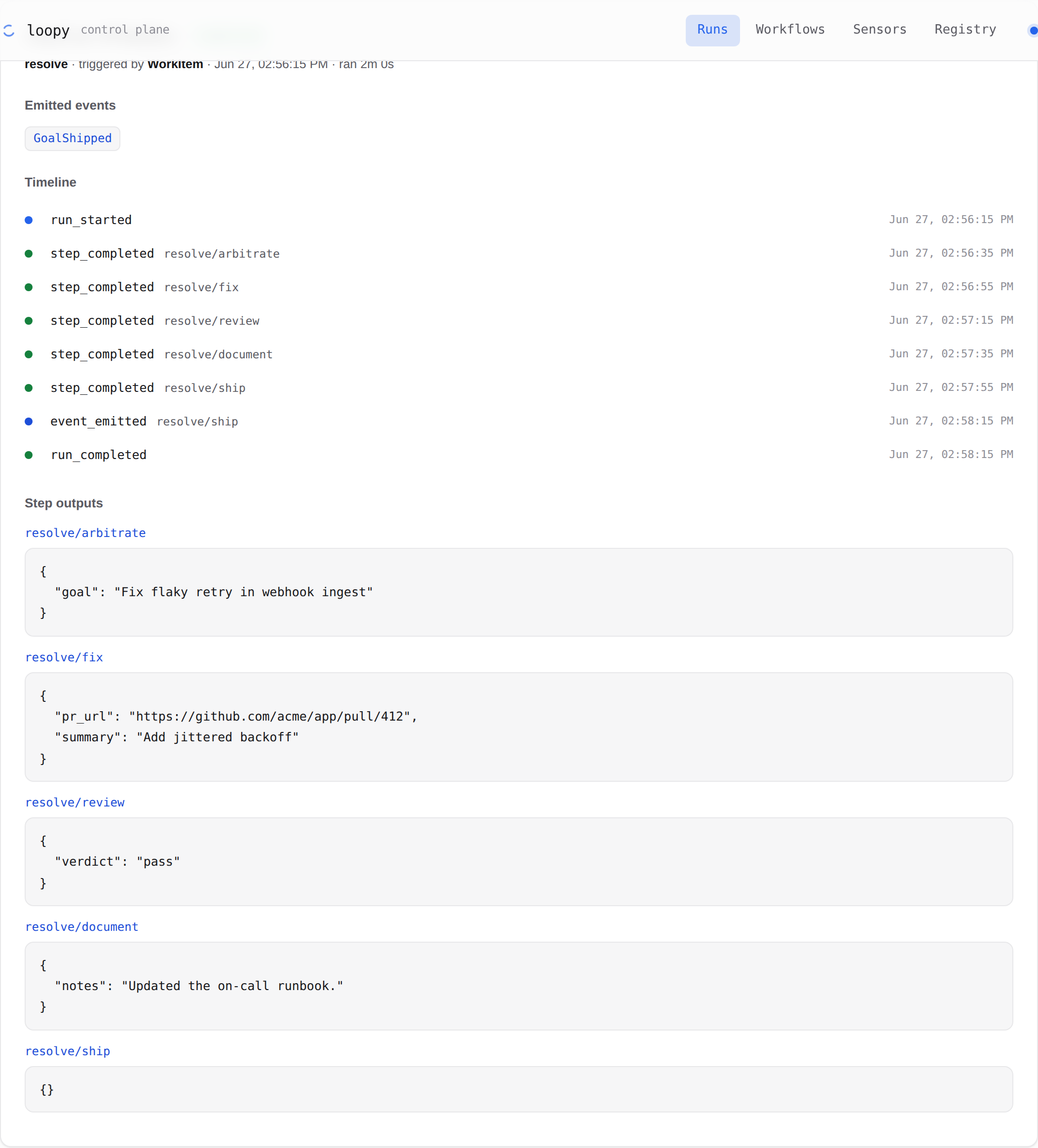
running has no duration yet.Open a run for the full picture: its derived state, the entry event, duration, any error, the events it emitted, the complete event-sourced timeline, and each step's validated output. That is usually enough to see exactly where a run spent its time or why it failed.
Workflows
The Workflows view draws each workflow as a graph: steps grouped into layers by their
after dependencies, with the entry step marked and each node showing its agent,
outputs, and emitted events. Steps with no dependency between them sit in the same layer, so a
parallel branch reads at a glance. Workflows are split into Scheduled (cron), each showing
its expression, timezone, last fire, and computed next fire, and Event-triggered.
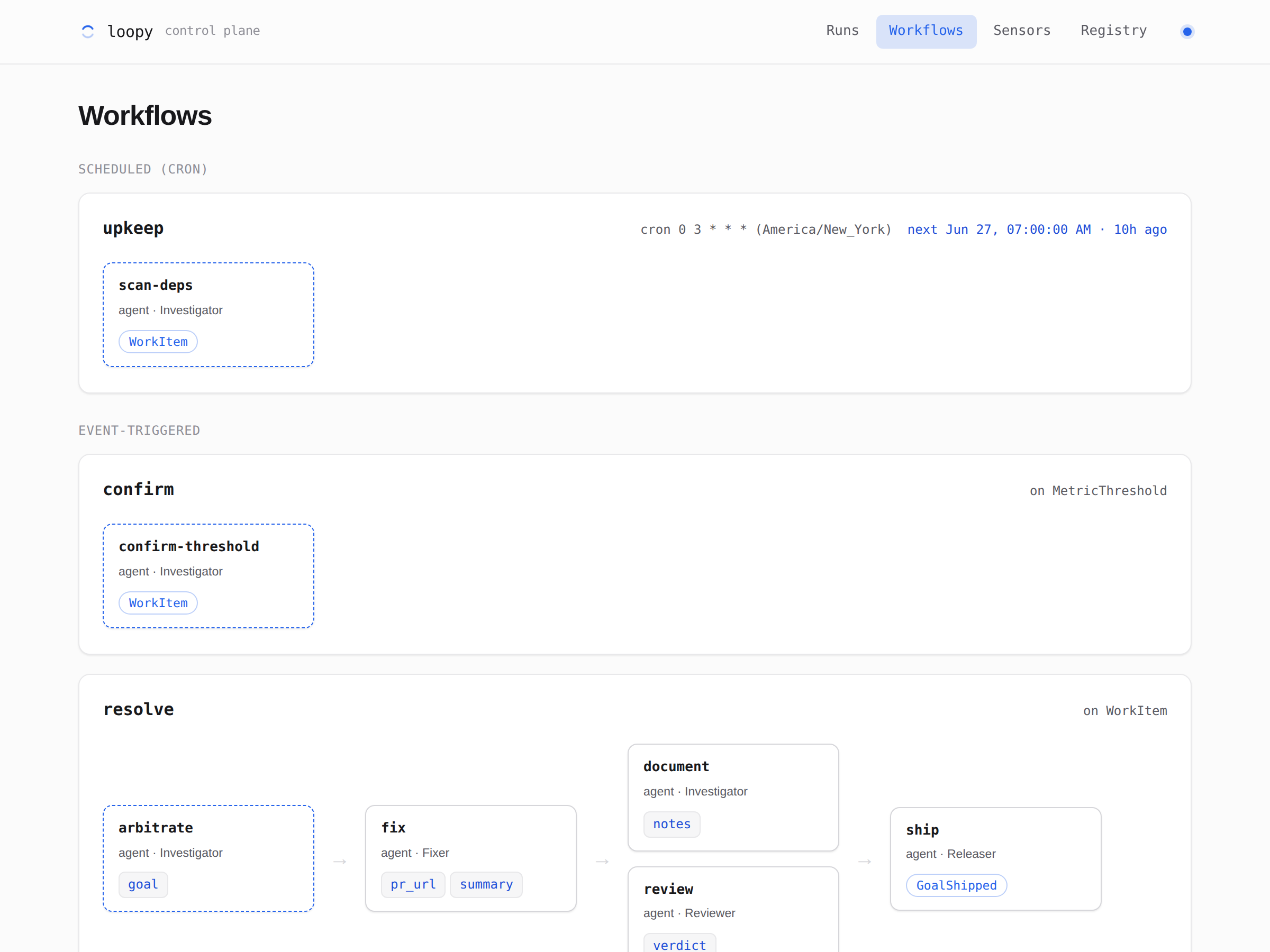
resolve workflow fans out to a parallel review and document layer before ship.Sensors and Registry
Sensors lists each input with its function signature and emitted event. Poll sensors also show their interval and last/next fire. Webhook sensors show their inbound path. Registry shows the reusable pieces your steps refer to: agents (model, harness, sandbox, skills), sandboxes (provider, image, optional network allowlist, repos), event contracts, and spend limits.